


The technology may be artificial, but the result—a more focused, balanced, and mindful gentleman—is very real.
Few people have likely missed the arrival of AI; soon, no matter which way you turn, there’s something involving AI. It ranges from news summaries, hairstyles, and translations to heat pumps, battery charging, and everything in between. Often, it feels like AI is used as a buzzword to make us believe that a product or service is something new and amazing.
In this month’s post, we take a closer look at what every gentleman (and everyone else) should know about AI—what you can use it for, what you shouldn’t use it for, and, most importantly, how you can personally get more out of “AI.” We’ll also provide some simple tips and examples on how you can improve your own use of AI, including a practical example of using the new technology to create a personal training coach.
To make the reading a bit more exciting, we let our AI assistants at Gentlemen of Sweden take over the pen for a few paragraphs—can you tell which ones?
What is Artificial Intelligence (AI)?
To understand what we can use AI for, we first need to understand what AI is. A quick search, in which we also asked AI (ChatGPT) what AI is, gave the following answer:
Think of AI as a computer program that can “think” and learn, somewhat like a human, but super fast and on an enormous scale.
What this means is that instead of just following a strict, predetermined list of instructions like many other programs we use—or like a regular calculator—an AI program is designed to:
- Understand its environment (by analyzing text, images, or sound).
- Solve problems or make decisions based on that information.
- Learn from its experiences to improve at the task over time.
Another analogy: If we continue with the calculator, which does exactly what you tell it, step by step, AI is more like a student—you give it learning materials (data) and a task (for example, writing a text or recognizing cats in images), and it figures out on its own how to complete the task, getting better over time the more it practices.
When AI Hallucinates
The student in the example above is rather lazy and daydreams quite often, which means that if the learning materials and instructions you give it aren’t extremely specific, it has no problem at all making up an answer that doesn’t need to be true. This is usually where things start to go off track when AI is used without careful consideration.
In the industry, this is simply called “AI Hallucination,” which means that AI generates false, misleading, or irrelevant information that sounds correct and plausible. This happens because the student has read a lot of books and can put the words in the right order but hasn’t understood the meaning of what it read, so it constructs its own version of reality and presents it as truth. Not entirely uncommon in the “real world” either, by the way…
Let’s begin with a simple experiment using something as common as clocks.

In more or less all advertising for clocks worldwide, the hands are set to 10:10. This is done so the hands don’t distract the viewer, especially if there are multiple clocks in the same image. When the AI student browses the web and learns everything about clocks, it finds information that clocks tell the time and are usually found on walls or wrists. Naturally, it learns a lot about how a clock works, what’s inside it, and much more—but all the images it “sees” show the time as 10:10. For a somewhat lazy and not always very sharp student, it’s easy to fall into the trap of thinking that clocks actually always look like that.
Let’s do a simple test and ask ChatGPT, which is one of the largest and most well-known AI models in writing at the moment, to show an image of a wall clock displaying the time 17:35. For anyone who actually knows how to read a clock, this is a simple task, so for an all-knowing AI, it should be an easy task…
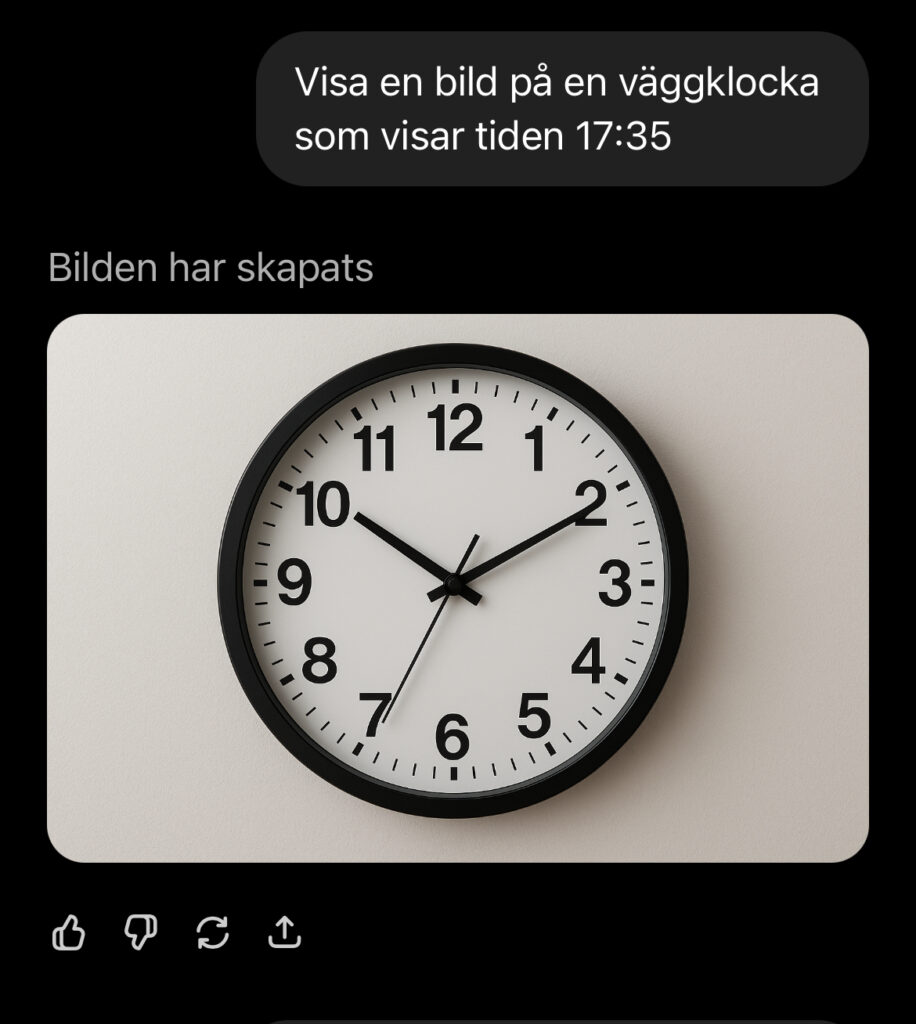
The image above shows a conversation with ChatGPT. We tasked the “student” with showing an image of a wall clock displaying 17:35… The answer it gives is partially correct: it knows what a wall clock is, but it has no idea what a clock showing 17:35 actually looks like.
Let’s do another experiment, this time with a city and a night sky.
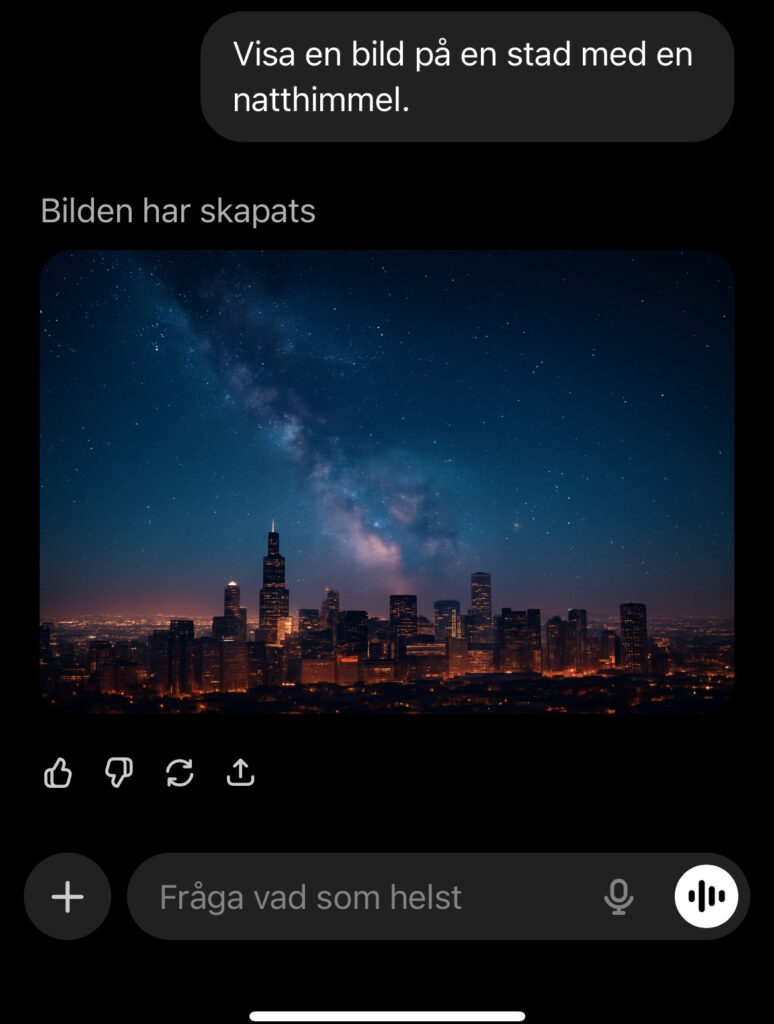
What happens here is a bit trickier and perhaps not as obvious, but for anyone who has ever tried to photograph the night sky, it doesn’t look like the image above—especially not near a city with all its lights. What our dear AI student did this time is that it “looked” at millions of images of cities at night and probably at least as many images of the night sky. The problem is that most images of the night sky are either edited or taken through a telescope and then edited. So once again, it starts to hallucinate and comes up with something that might seem correct to someone who doesn’t know the actual truth.
Both experiments above demonstrate AI’s weakness: it has a vast amount of information, but it’s improperly ranked, so it presents completely wrong answers in a convincing way. Our AI student suffers from a cognitive knowledge bias—the Dunning–Kruger effect—just on a global scale.
How AI Actually Learns
AI gains its “intelligence” through something called machine learning, although in the industry the English term “Machine Learning” is more commonly used.
Where does it get its knowledge?
Let’s start with where AI gets its information. The computer analyzes massive amounts of data collected from the Internet and other sources that are fed into it. It’s a bit like giving the AI student we mentioned earlier access to every library and website that exists.
Simply put, this means that a text-generating AI (like ChatGPT) reads text from billions of web pages, books, articles, and other sources containing letters and symbols, while an AI designed to recognize images goes through countless millions of pictures of everything from dogs and cars to people and landscapes—and, of course, the occasional night sky and clock, as we saw in our examples above…
What does it do with all the information it looks at?
Once our AI student has downloaded the website, the picture of the clock, or the cat video, the actual learning begins. The system uses something called a “neural network,” which is inspired by how human brain cells, neurons, function.
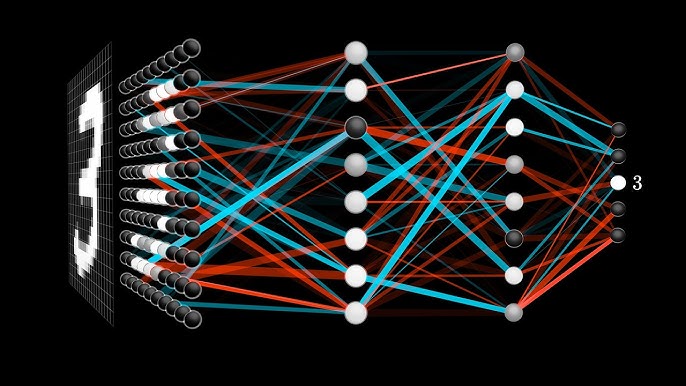
Simplified, this can be divided into three steps: patterns, weights & values, and last but not least, understanding.
- Patterns
It starts by looking for patterns and relationships in all the information. For example, it learns that the number 3 looks a certain way, just as it learns that a cat usually has pointed ears, whiskers, and a certain shape of eyes and tail. It records pixels, angles, lines, and patterns. Millions of images and connections are registered and stored. - Weight and Value
Once all the patterns are registered, our AI student starts weighing the information and assigning it a value so that it “knows” that a clock is a clock and a cat is a cat. To achieve this, humans sometimes need to give it a little help—so every time we surf the Internet and encounter a box asking us to “prove you’re human” by clicking on crosswalks, horses, buses, etc., we’re actually helping a computer get better at understanding what it’s looking at. - Understanding
After billions of tests and adjustments, the AI has created an extremely complex set of “rules” and “weights” that allow it to predict the next word in a sentence, identify an object in an image, and so on.
The principle of how our AI student learns is the same as a child. The child sees a dog (pattern), thinks for a moment and recalls all the other similar animals it has seen, concluding, “Yes, this is probably the same kind of animal I’ve seen before—fluffy, four legs, ears, and a tail” (weights and values), points to the dog and says “Dog” (understanding). If the parent then says something like, “Yes, look at what a cute dog!” two things happen:
1. The weight and value are adjusted so that the next time a similar pattern appears, the probability that it will also be a “dog” increases. The child reinforces the already existing knowledge that a dog is a dog.
2. The pattern “dog” is also linked to the words “hund” (dog in Swedish) and “cute,” which are given weights and values as well. The child learns that a “dog” can also be called a “hund” and that it is generally “cute.”
Now that we know how the AI student learns, it’s fairly easy to understand the system’s problems. It knows more or less everything that has ever been written or published, but it has no idea what is true or false—it can only weight texts and patterns by assigning them a number. The AI student “knows” that a hammer is used to drive a nail and scissors are used to cut hair or a beard, but it has, so far, never actually used a hammer or scissors. This is something we need to keep in mind when we ask questions or seek help from our AI student.
What a Gentleman Should Keep in Mind When Using AI
Our AI student is lazy but fantastic at spotting patterns and weighting them—and that’s what we need to remember when using it. To make it easier to think about our AI student, imagine it has now graduated and just gotten its first job (your task). Our AI student is now a proud AI agent. Let’s take an example of what it might look like when our new AI colleague is given a fairly common task.
AI as a Personal Assistant
Once our AI student has graduated and gotten its first job, it does what most young new employees do—tries to please. It listens, learns, and is happy to help, but it needs clear instructions. For the gentleman, it can become a sort of digital butler, always ready to assist without stealing the spotlight. Here are some examples of what our butler can help with.
- Plan your week
- Helping with travel plans, languages, recipes, or gift ideas
- Keeping track of workout routines (we’ll look at a personal training coach a bit later)
Example 1: Weekly Planning with ChatGPT as Your Digital Butler
Step 1 – Give the AI access to the information it needs to analyze
We start by giving ChatGPT access to what the week currently looks like and what we need to plan. The easiest way to do this is simply by writing something like this:
Here are my scheduled meetings and activities for next week:
Monday: 09:00–10:00 team meeting, 17:30 gym
Tuesday: 13:00 client meeting, 19:00 dinner with friends
Wednesday: 08:00 dentist, 15:00 strategy meeting
Thursday: 10:00–11:00 sales meeting, 18:00 kids’ sports practice
Friday: 14:00 delivery meeting, 16:30 after-work with colleagues

I also need time to do the weekly grocery shopping and write at least 3 hours on my new book.
Step 2 – Ask it to analyze your schedule
Then you write:
Help me plan my week more efficiently so that I have time for both workouts, recovery, and some planning time for the following week!
Step 3 – ChatGPT then responds with a structured overview
- Suggestions for when you can schedule short focus sessions between meetings.
- Time for workouts without conflicting with recovery periods.
- Reminders to include buffer time between travel and meetings.
- A clear daily rhythm (morning, focus, meetings, recovery).
Step 4 – Follow-up and Improvements
At the end of the week, you can tell your personal assistant how the week went—what went well and what didn’t. This helps the AI assistant improve, as you’re helping it weight its responses so that the advice you get fits you better.
For example, you could write something like this:
This schedule worked well, but I had too little time for emails and planning. How can we adjust it for next week while also including time to make 10 client calls?
In this way, the AI learns your style, pace, and priorities—and gradually becomes better at acting as your personal planning partner.
Helping with travel plans
Our AI assistant is also an excellent help when it comes to planning trips. Tell your AI assistant:
- Where you’re going
- When you’re going
- Who you’re traveling with—whether it’s your partner, friends, colleagues, etc.
- Tell what you’re interested in doing and what you absolutely don’t want to miss.
You could write something like this:
Help me plan my trip. In February, my partner and I are flying to Delhi for a one-week vacation. We’ll be staying in a central location and enjoying culture, as well as good and exciting food. Help me plan the week so we don’t miss the most important sights in Delhi, and also recommend what we absolutely shouldn’t miss eating.
Your AI assistant will now compile a guide for you and your partner, mixing culture, history, and exciting food experiences. You can then work further with this draft, asking your AI assistant to increase or decrease the number of cultural activities, suggest other dishes to try, and much more.
Here you can see day one and two of the itinerary that my AI assistant suggested when I asked.
Day 1: Arrival & relaxed start
- You arrive and check in at a central location—perfect for walking or taking short taxi/tuk-tuk rides to save time.
- Take a walk around the area—for example, around Connaught Place—and perhaps stop by a café or bar for a relaxed first evening.
- Dinner: choose something local but not too “wild” for the first day—just to get acquainted with the flavors.
Day 2: Old Delhi & Historical Gems
- Morning: visit the Red Fort (“Lal Qila”), one of the great Mughal forts.
- Gå vidare till Jama Masjid, Indien’s stora moské i Old Delhi-delen — bra att gå tidigt för att undvika folkmassor.
- Lunch: In the area around Chandni Chowk – here you will find plenty of authentic street food and small hole-in-the-wall spots.
- Afternoon: stroll through the narrow alleys of Old Delhi, see the commercial areas and old markets (for example Khari Baoli – the spice market).
- Evening: perhaps experience the evening light at the fort or simply enjoy a delicious dinner in the area.
Of course, your assistant will also provide you with links, images, and other information about the various activities, all to ensure your trip is as good as possible. You can see the full response I received from my assistant in the video below.
AI as workout coach
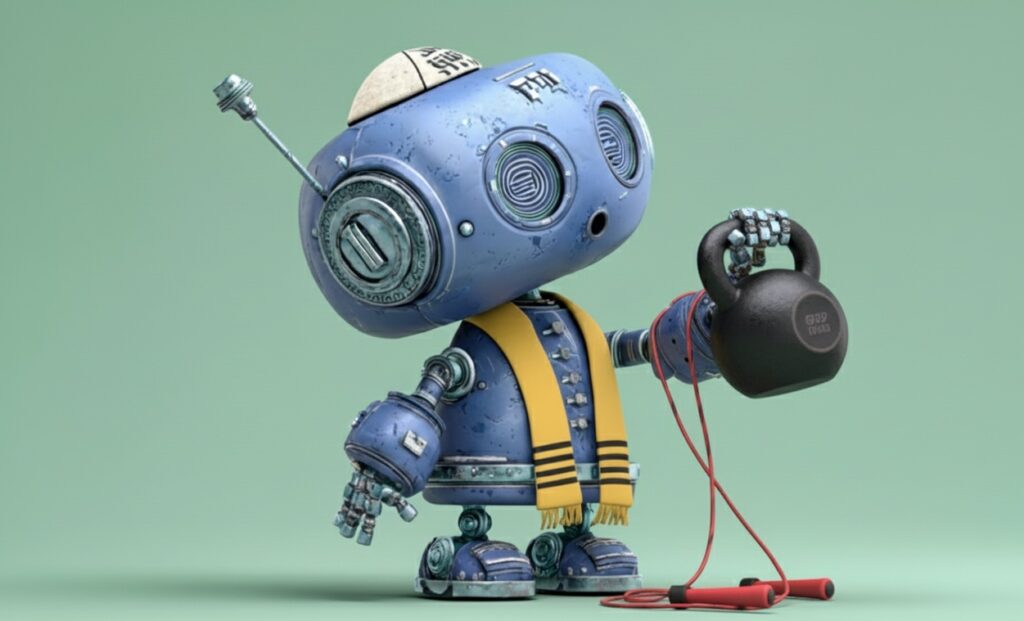
We have all been there at some point in our lives; there simply aren’t enough hours in the day to make it to the gym. We know it’s something that makes us feel good and is necessary, but it just doesn’t happen. There could be any number of reasons why, but the bottom line is that it doesn’t get done. So why not try and see what happens if we turn to our AI assistant?
1. Begin by copying the text below. Use the text below as a template and modify it according to your personal goals and preferences.
I want you to act as a fitness coach for me.

I haven't worked out in a long time, but I have a fairly active job where I move around a lot. I don't have time to go to the gym, so I need help with workouts that I can do at home or outdoors; feel free to mix the sessions between indoors and outdoors unless I ask for something else due to weather or other circumstances. I don't have access to any exercise equipment right now, but I'm open to investing in things like kettlebells, a jump rope, or other equipment that doesn't take up much space.

I am a 49-year-old man. I am 175 cm tall and weigh approximately 75–78 kg. My fitness goals are to improve my cardiovascular health, strength, and flexibility. I have no injuries or other physical issues, but I am not fond of running long distances; I am happy to do intervals, but not long-distance running.

I want you to help me get started with my training by creating workout programs that are between 15 and 20 minutes long, 2–3 times a week to begin with. Also, account for a few minutes of warm-up so that it isn't missed.

We can potentially increase both the frequency and the length of the sessions further down the road. Give me the week's first session with exercises right away. Use the first two weeks as both a baseline for my fitness and form and a "get started" period. Please include some exercises to measure my current form, such as push-ups, burpees, or squats etc.

I'll give you feedback after each session on what was good and bad, so that you can use my recorded sessions to calculate my current fitness and strength to help me reach future goals.

Further down the road, I will also start logging my diet so that we can review that as well, in order to further optimize my progress toward the goal.

Do you have any questions at all or suggestions that I should take into consideration for the future to ensure our collaboration is as good as possible?
4. Answer the questions from your new coach.
Once you have pasted the text above into your AI assistant and pressed enter, you will receive follow-up questions that depend somewhat on the information you provided in step 1; the answers will help give your new coach an even better foundation for your journey together.
3. Pin the conversation
The final thing you need to do is “pin” the conversation with your new fitness coach in the app or website you are using. This makes it easy to find your conversation to log workouts or discuss the week’s various exercises. If you are using Google’s AI Gemini, there is a small “pin” icon to the right of your conversation that you can use to “pin” it. If you choose to use ChatGPT instead, you can save your “coach” by bookmarking the conversation link in your web browser (this works for Gemini as well, of course).
4. Last but not least
Start using your new AI coach! Tell it what you like or dislike about the workouts you do. If you find something fun on Instagram, Facebook, or YouTube – describe the exercise and try it out; there are no rights or wrongs, and you don’t need to worry about saying anything silly or strange to it.
It won’t do your push-ups for you, but from my own experience after hundreds of logged training sessions, I can promise you it’s an interesting journey…
What a gentleman does NOT delegate to AI: Character, ethics, and human judgment.!
A true gentleman never lets technology replace his judgment – it enhances it. AI can polish his calendar, but never his character. AI can polish his calendar, but never his character. As you have seen above, there are tasks a gentleman can gladly delegate – and those he always performs himself. Helping to plan the week or structuring workout sessions? Perfect for a digital butler. But making decisions that require judgment, feeling, style, and morals – that is never left to an algorithm!
The Gentleman’s Ethical Red Line
The AI assistant is fantastic at giving you the most likely answer, but it lacks the ethical compass that distinguishes true from false and right from wrong. Therefore, a gentleman always bears the personal responsibility for:
- Human judgment: AI is amoral; it is simply programmed to be efficient. Therefore, it must not make decisions regarding moral dilemmas, workplace conflicts, or other sensitive private matters. Choosing to do the right thing, even when no one is watching, is and must remain a human choice.
- Integrity and source criticism: Since AI assistants sometimes “hallucinate” and create false but credible information, source criticism is a must. Do not blindly trust the answers you receive. A gentleman always double-checks facts and uses his common sense to filter the results.
The nuance that only a gentleman masters
Your AI assistant can analyze millions of lines of statistics, but it does not have the ability to “read the room” or understand subtle relationships.
- The decisive nuance in communication: Your AI assistant can write a draft for an email, but it can never replace your tone, your style, or your intuition. A gentleman uses the AI assistant to get a clear draft, but then adds the decisive nuances and the personal warmth that build the relationships the assistant will never be able to build.
- A sense for relationships: An AI assistant can suggest what you might want to eat and how to cook it, but only you know what you are craving. It can remind you of an anniversary – but it doesn’t know which wine she prefers when the sun is shining at your favorite restaurant by the sea, or which flower says more than a thousand words to her. These personal gestures are where character and human memory are proven.
A gentleman understands that technology is a tool, not a replacement for personal responsibility. He allows the AI assistant to assist in planning and analysis, but protects the human element – the judgment, the nuances, the silent intuition. It is not about distrusting the machine, but about preserving one’s humanity.
Gentlemannens regler för AI-kommunikation.
A few final tips to make your AI journey a little easier, remember that it is a computer you are “talking” to.
Rule 1: Give the AI assistant a role
To facilitate future collaboration with your assistant, it is always beneficial to give it a role; this allows it to learn and provide increasingly better answers the more feedback you give it along the way. For example, create a fitness coach for training, a chef’s assistant for help and inspiration when cooking, or perhaps an “IT technician” for questions about computers.
Rule 2: Give the AI assistant restrictions:
Tell your AI assistant what it is not allowed to do, and it will deliver significantly better results for you. As we mentioned earlier in the text when our training coach was created, we told the assistant that we could consider “investing in kettlebells, jump ropes, or other equipment that doesn’t take up much space”—that is a restriction so that it doesn’t get the idea that we should buy an entire gym.
Rule 3: Iterate and Adjust
You can ask your AI assistant to tell you how technical, funny, pompous, or political a text or an image is on a scale of 1 to 10. Once it has responded, you can ask it to adjust the text according to the same scale. This makes it easier to change the result you get from your assistant.
Rule 4: Ask clear questions
If you are clear, you get clear answers; feel free to add “ask the questions you need answered to provide a better response” when you ask your AI assistant for something.
Rule 5: Use AI as a sounding board
Do not let AI replace you and your own thinking; let it become an extension of you. Once you have used AI for a while, you quickly learn to see what has been created by an AI or by a human.
Rule 6: Always double-check the answers and use common sense
Do not blindly trust the answers you receive; if it is something important, ask the question in different ways and to several different systems. You will be surprised by how many different answers you will get.
Test several tools
Different AI models are good at different things; they are all similar, but certain things differ. Test them all and see which one suits you best. Technically speaking, they are always about 3 weeks apart in development—sometimes one of them is first, sometimes it is last.
The AI tools that I personally use frequently are Google Gemini, ChatGPT, and NotebookLM. NotebookLM can be seen somewhat as a research partner or study buddy for working with information, books, texts, etc. The video below was created by giving NotebookLM access to this blog post. One last thing that might be good to keep in mind: the tools above have free versions that will take you a very long way!
NotebookLM presents “En gentlemans guide till AI”
Listen
Do you prefer listening when others discuss a topic? No problem—here is an example of what it can sound like when two AI assistants discuss the blog post you just read.
View
Let an AI assistant present the post above to you in a video.
Over to you
Did you learn something new, and did you find which paragraphs were written by our AI assistants? Do you have any questions about the text or feedback on the text? Get in touch with us or leave a comment below! We read and respond to everything.